RPM Watermark PDF Transform
Screenshots in this article are from RPM 7.0.
This transform adds a watermark to PDF content.
Purpose
You can use this while generating PDF, perhaps after the Text to PDF transform or PCL to PDF. Or you can also use this as the only transform, possibly adding a watermark to a PDF created some other way in RPM, or perhaps sent as the print job.
Input & output
Required input: PDF
Output: PDF with a watermark added
Notes: you can use any means you like to provide PDF data for this transform, including:
- use this transform with a print job in PDF format; typically this would be the first in the list, perhaps the only transform
- use this transform following a Text to PDF transform
- similarly, use this following a PCL to PDF transform
Setup
RPM includes an Image Overlay manager which maintains a list of overlays. These overlays include the image file, where on the page the image will appear, which page, and more.
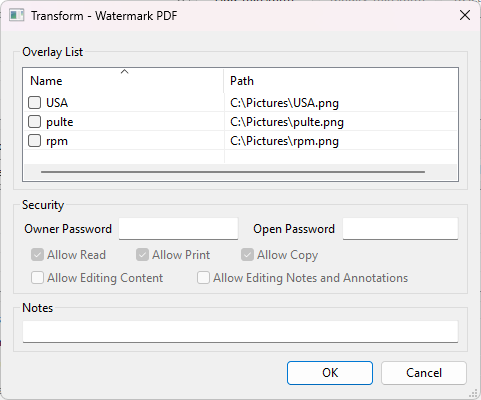
In the Watermark PDF dialog:
- Overlay List Tick each of your predefined overlays to include.
- Security Optionally protect the resulting PDF. Owner Password lets whoever has it change the permissions; Open Password is required to open the file; Allow Read, Allow Print, Allow Copy, Allow Editing Content and Allow Editing Notes and Annotations set what someone who opens it may do.